
How Does Apple Pay Work for Online Businesses in Malaysia and Singapore?
October 16, 2026
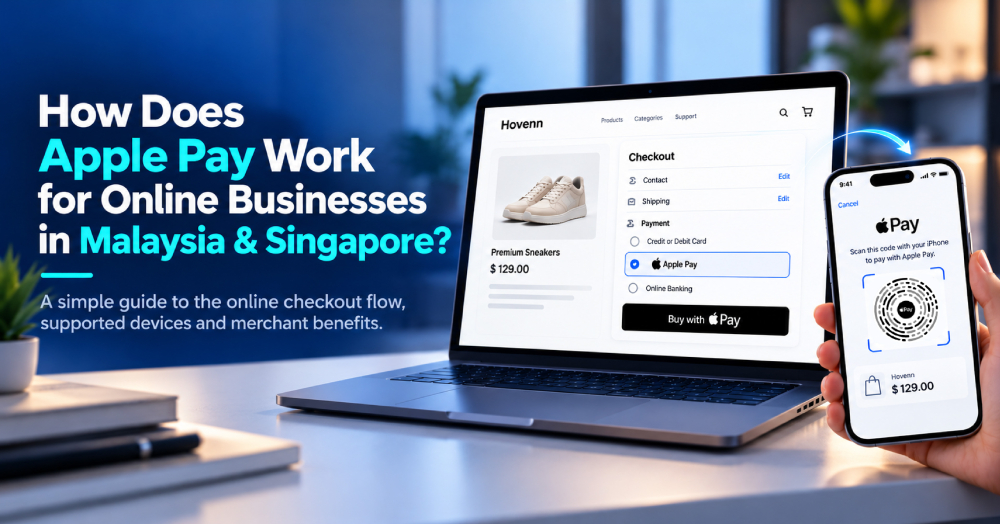
Apple Pay lets eligible customers complete online purchases using cards stored in Apple Wallet. For businesses in Malaysia and Singapore, it can provide a convenient checkout choice across supported websites, apps and browsers—without requiring customers to re-enter card details for every payment.
What Is Apple Pay?
Apple Pay is a digital payment method available on compatible Apple devices. Customers add eligible cards to Apple Wallet and authorise purchases using Face ID, Touch ID or a device passcode. Apple Pay uses tokenised payment credentials, so the customer's actual card number is not shared with the merchant as part of the Apple Pay transaction.
How Does Apple Pay Work During Online Checkout?
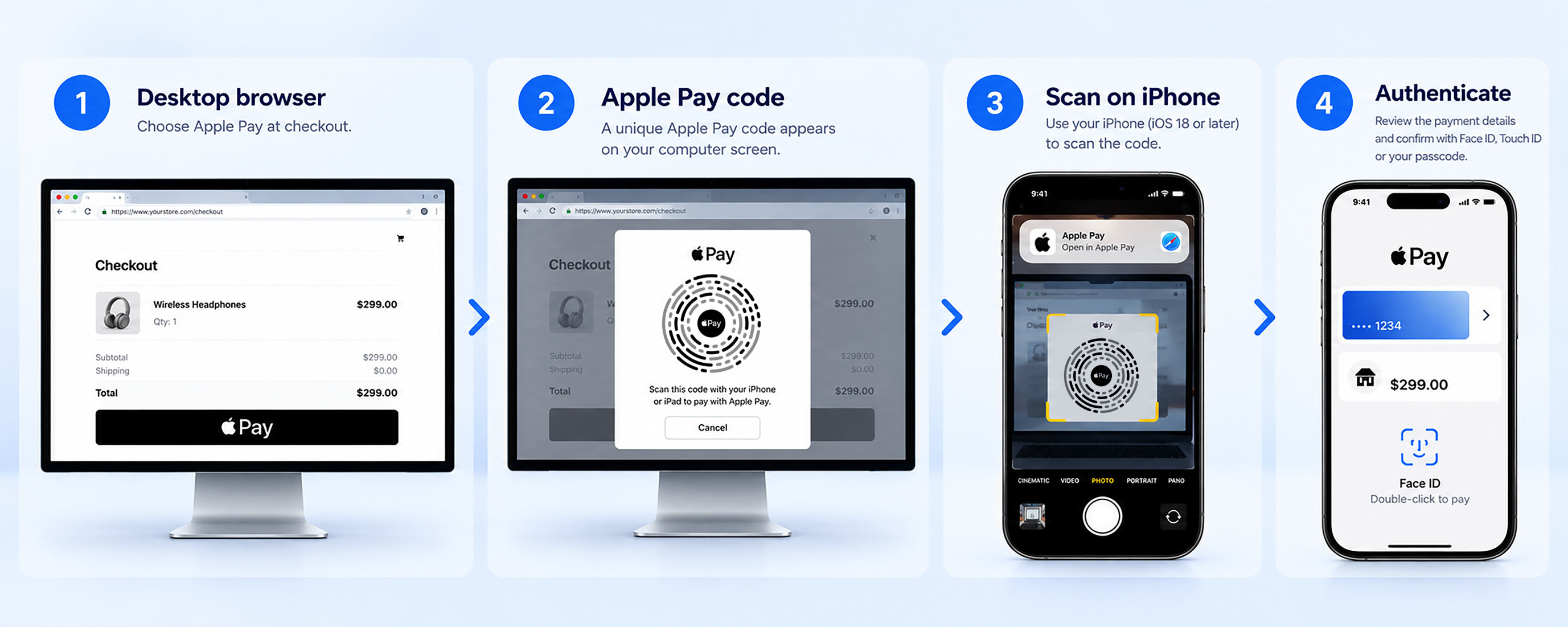
On a participating website or app, the payment journey typically follows four steps:
Can Customers Use Apple Pay on a Laptop or Windows PC?
Yes, on participating websites in compatible browsers. Apple Pay is not restricted to Safari: eligible customers can initiate checkout in supported third-party browsers on a Mac or PC, then complete the payment using an iPhone or iPad.
On a compatible Apple device
Select Apple Pay → Review payment → Authenticate on the device → Complete
On a compatible desktop browser
Select Apple Pay → Scan the Apple Pay code with an eligible iPhone or iPad → Review and authenticate → Complete
For the third-party browser flow, a dynamic Apple Pay code appears on the computer screen. Customers scan it using an iPhone running iOS 18 or later, or an iPad running iPadOS 18 or later, then review and confirm the purchase on that device. The payment result returns to the merchant's website.
Source: Apple — Apple Pay in Third-Party Browsers.
What Are the Benefits of Apple Pay for Online Businesses?
1. Less manual effort at checkout
Eligible customers use payment credentials already stored in Apple Wallet, reducing repeated card entry—particularly useful when shopping on smaller mobile screens.
2. Familiar authentication and payment security
Device authentication and tokenised credentials help protect sensitive card information while offering customers a familiar way to authorise payments.
3. A payment option across digital channels
Merchants can consider Apple Pay for supported websites and mobile applications. Whether this translates into higher conversion depends on the merchant's customers, checkout design and implementation; results are not guaranteed.
Apple Pay for Merchants in Malaysia and Singapore
Apple Pay is available to eligible cardholders in both Malaysia and Singapore. The checkout experience is broadly similar across the two markets, so businesses should focus on what matters operationally: merchant eligibility, supported cards and networks, payment-provider coverage and integration requirements.
How Can Fiuu Help Merchants Enable Apple Pay?
Fiuu supports Apple Pay as part of its wider online payment offering. For merchants, the value is not just adding another checkout button: it is assessing Apple Pay alongside other payment channels, with integration resources and a payment setup suited to their customers and operating markets.
1. Integration resources for web and mobile
Fiuu provides Apple Pay integration materials for merchants and technical teams evaluating web and mobile checkout. Start by confirming your business eligibility and supported integration method, then test the eligible device and browser journeys before going live.
2. More payment choices through one provider
Fiuu offers payment options beyond Apple Pay, including card payments, online banking and e-wallets where available. This lets merchants plan Apple Pay as part of a wider checkout mix for local and cross-border customers. Available methods and integrations vary by merchant market and account.
3. What should merchants confirm before launch?
| Area | Practical check |
|---|---|
| Market eligibility | Confirm Apple Pay availability for your Malaysia- or Singapore-based business entity and account. |
| Integration | Identify the supported website, mobile app or plugin integration and any setup requirements. |
| Browser experience | Confirm whether third-party browser code-scanning is supported by the selected Fiuu integration. |
| Testing and reporting | Test successful, failed and cancelled payments; check how transactions appear in reporting and reconciliation. |
Merchants can review Fiuu's Apple Pay integration resources and contact the team to determine the appropriate setup.
Frequently Asked Questions
-
Can online businesses in Malaysia and Singapore accept Apple Pay?
Yes, when their payment provider supports Apple Pay for the merchant's market, account and integration, and applicable requirements are met.
-
Does Apple Pay work on Windows PCs?
Yes, on participating websites using compatible browsers. Eligible customers can scan a displayed Apple Pay code with an iPhone or iPad to authorise the purchase.
-
Does Apple Pay only work in Safari?
No. Supported third-party browsers can offer Apple Pay through compatible merchant integrations.
-
Can international customers pay with Apple Pay?
Potentially, if the merchant supports Apple Pay and the customer's card, network and transaction are eligible.
-
How can I enable Apple Pay through Fiuu?
Review Fiuu's Apple Pay resources and contact the team to confirm your business eligibility, available integrations and implementation requirements.
Enable Apple Pay for Your Online Business with Fiuu
Find the Apple Pay integration that fits your website or app, confirm availability for your business in Malaysia or Singapore, and explore other supported payment options with the Fiuu team.
Explore Apple PayContact FiuuRelated Posts





Your one-stop payment partner for business growth.
Sign Up
Comprehensive Payment Channels
Unlock over 110 major payment methods across Southeast Asia.

One Integration, One Platform
Enables business to accept local and cross-border payments in Southeast Asia.

Seamless, Easy, and Instant
Sign up with digital on-boarding and start accepting payment within minutes.